What a week looks like in Bolus
Your week is seven days of breakfasts, lunches and dinners, put together for you, with a shopping list to match. The Upcoming tab is where you see all of it at once.
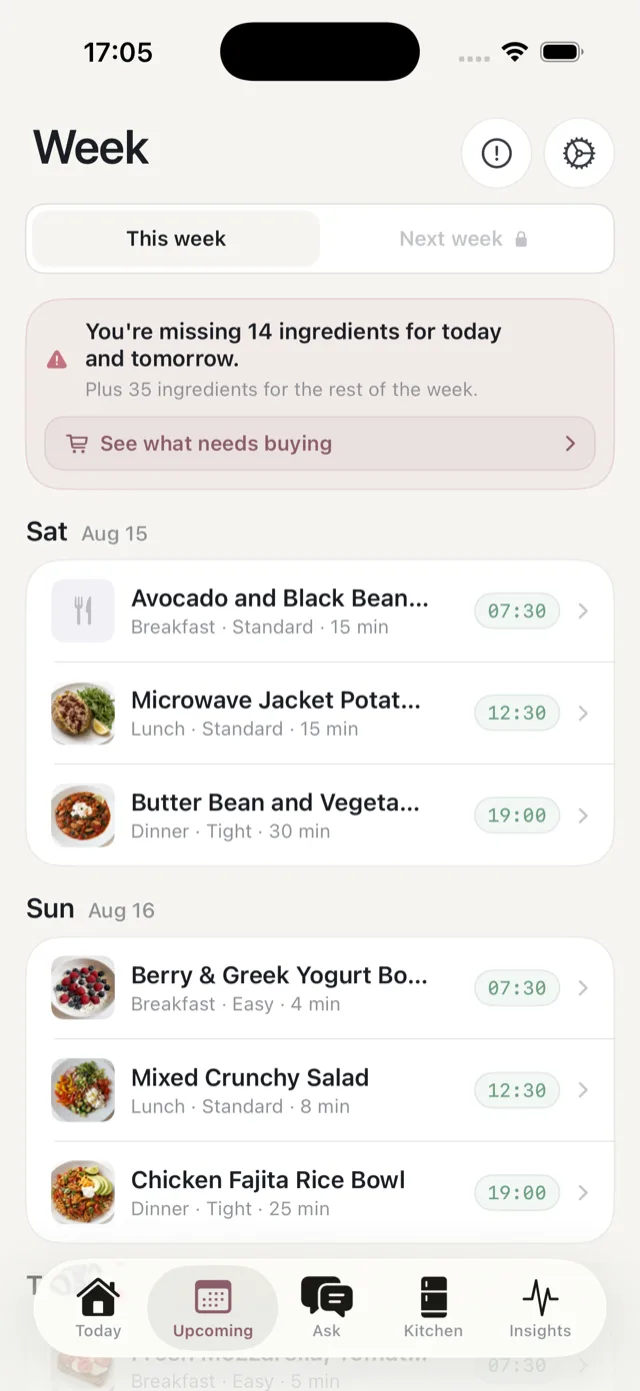
This week and next week
Two buttons at the top switch between This week and Next week. Next week stays locked until you have done your weekly review and created it, so most of the time you are looking at the week you are in. See when your next week arrives.
Reading a day
Each day is a card headed with the day and date, holding its meals in order. Every row shows:
- The meal name, with a photo where there is one.
- The meal type, the effort badge and the time it takes, for example “Dinner · Tight · 30 min”.
- The time it is planned for, as a badge on the right.
- Its status, once there is one: Ate, Skipped or Ate out.
Tap any row to open the meal: ingredients, method, and nutrition per serving.
The banner at the top
If you are short of anything for the next couple of days, a banner says so and counts what is missing, with See what needs buying to take you to the Kitchen tab. See when you are short of ingredients.
Nothing here is fixed
Every week is a starting point. You can swap a meal, change your portion or household size, or tell Bolus you are eating out or skipping. It all feeds into how the next week is built.
To understand the bigger rhythm, read how Bolus works: the weekly loop.