Changing your mind
Skip a meal or eat out
Plans change. Something else on the meal card covers the two most common reasons a planned meal does not happen.
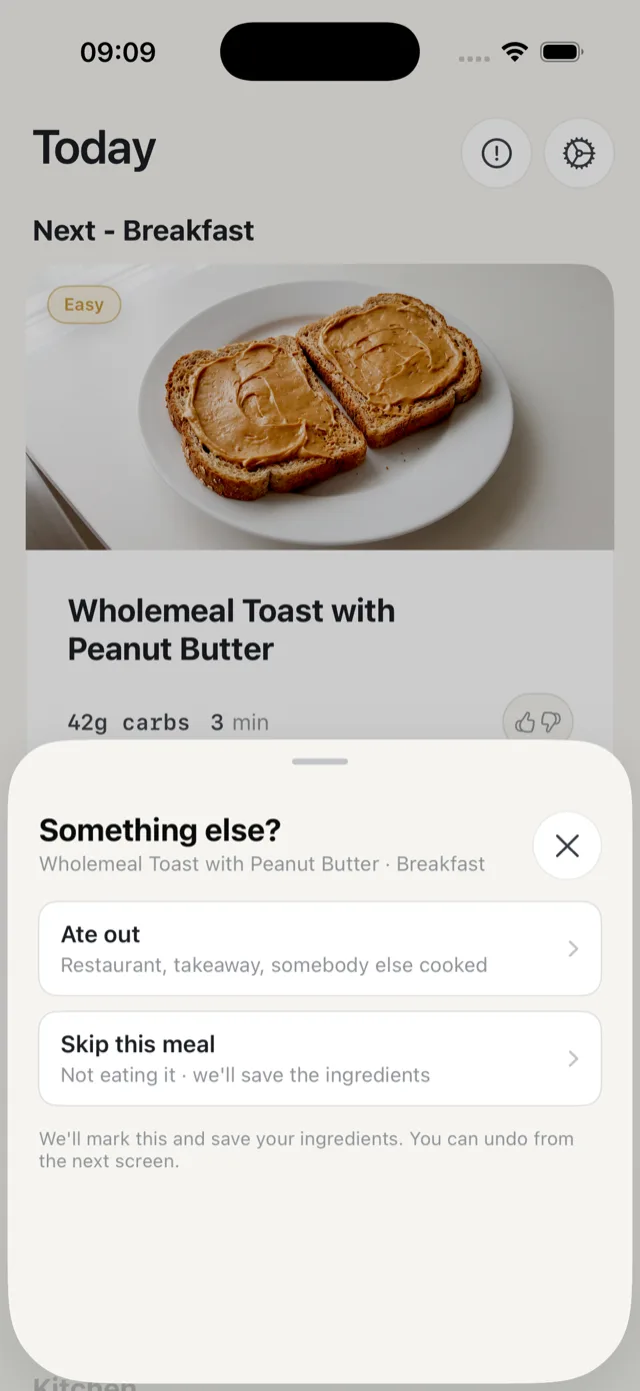
The two options
- Ate out is for a restaurant, a takeaway, or somebody else cooking.
- Skip this meal is for not eating it at all.
Either way Bolus marks the meal and saves the ingredients you had bought for it.
What happens next
Bolus may move the rest of the week around to make use of what you have in, and tells you so on a Week reshuffled sheet that lists any meals it moved and any ingredients it saved for later. From there you can See the week, Undo if that was not what you meant, or just close it. See undo a change.
If you would rather the meal simply went, tap Discard this meal on that sheet. The ingredients come off your shopping list instead of being saved.
What happens to the ingredients
Anything you had already bought for that meal moves into the Surplus section of your shopping list, so it is not lost and you can use it elsewhere in the week. See the surplus section.
Does it count against you?
No. Meals you skipped or ate out are not counted in your food quality figures, so a busy week does not drag them down. Bolus also treats a one-off skip differently from a meal you genuinely dislike: skipping because the night got busy will not make a good meal disappear. If you did not like the food, use the thumbs down instead. See what your ratings do.
For a day that has not come yet
You can do the same from any future meal in the Plan segment of the Food tab, for example when you already know Friday is a night out. The meal gets an Eating out badge and Bolus plans around it.