Weight
Set a target weight
If your goal is losing weight, you can set yourself a target and Bolus draws your path to it on the weight chart. It is optional, and it is part of Bolus Premium.
Setting one
Tap Set a target on the weight card, or open Target weight in Settings. The editor shows your current weight, a suggestion, and a graph that follows the figure as you move it.
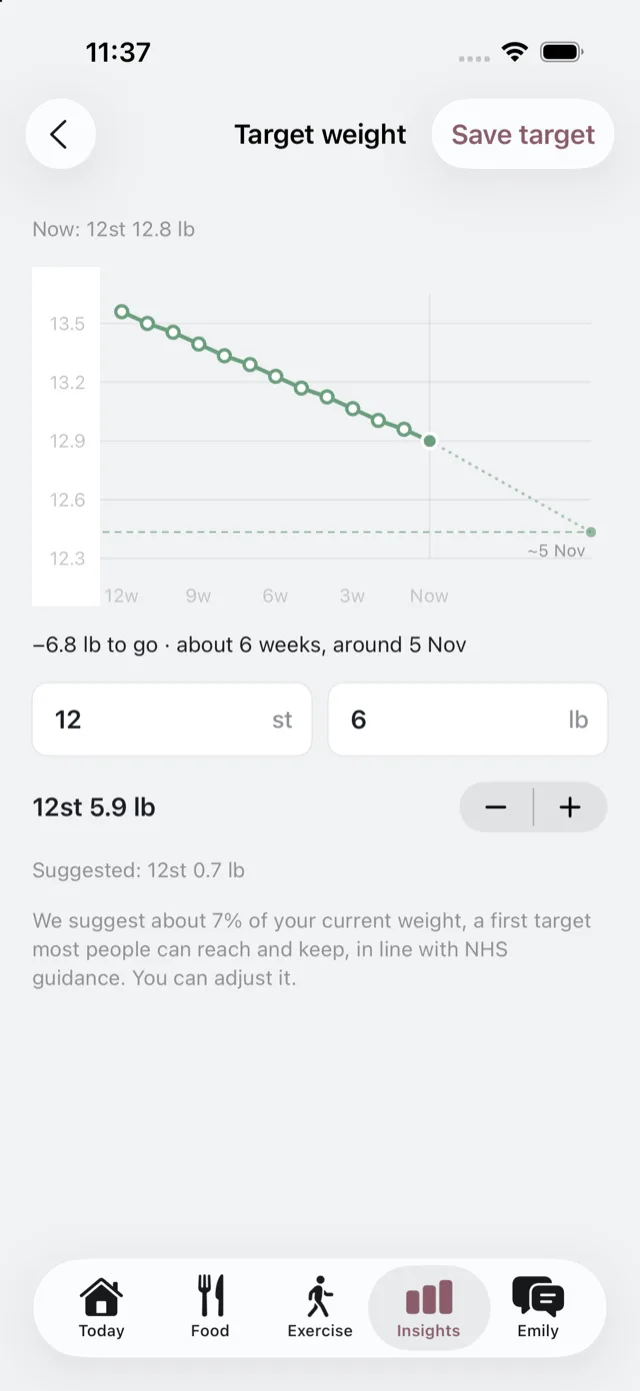
Where the suggestion comes from
About 7% of your current weight, a first target most people can reach and keep, in line with NHS guidance. You can adjust it. Bolus will not accept a target below the healthy weight range for your height, and it has to be at least 1 kg below what you weigh now.
What it changes
- Your weight chart draws a path to it, with roughly when you would arrive at your current pace.
- Your plan works towards it.
- Emily coaches you towards it, and follows up on what you agreed.
Everything about the pace is described as approximate. It is a path, not a promise.
It belongs to the weight-loss goal
A target weight comes with the goal of losing weight. If your goal is something else, Bolus says so and offers to change your goal, rather than changing it quietly. Both are yours to change whenever you like: the target here, the goal in Settings. See your goal and profile.
Changing or removing it
The same control becomes Edit target once one is set, and the editor has Remove target. Removing it takes the path off the chart and changes nothing else.
If you cannot set one
If Bolus cannot work out a safe target from your details, it says so rather than suggesting a figure, and points you to your care team to decide what a healthy weight looks like for you.
Bolus is not a medical device and a target here is not a clinical goal. If you are unsure what the right weight is for you, that is a conversation for your GP or diabetes team.