Your data
Delete your account
Delete account is at the very bottom of Settings. It is permanent.
What it erases
Your account and all of your data: your profile, your plans, your shopping lists, your meal history, your Insights, your conversations with Emily, and any connected glucose, movement and weight data. There is no way to recover it, and support cannot restore it for you.
Bolus asks you to confirm before anything happens.
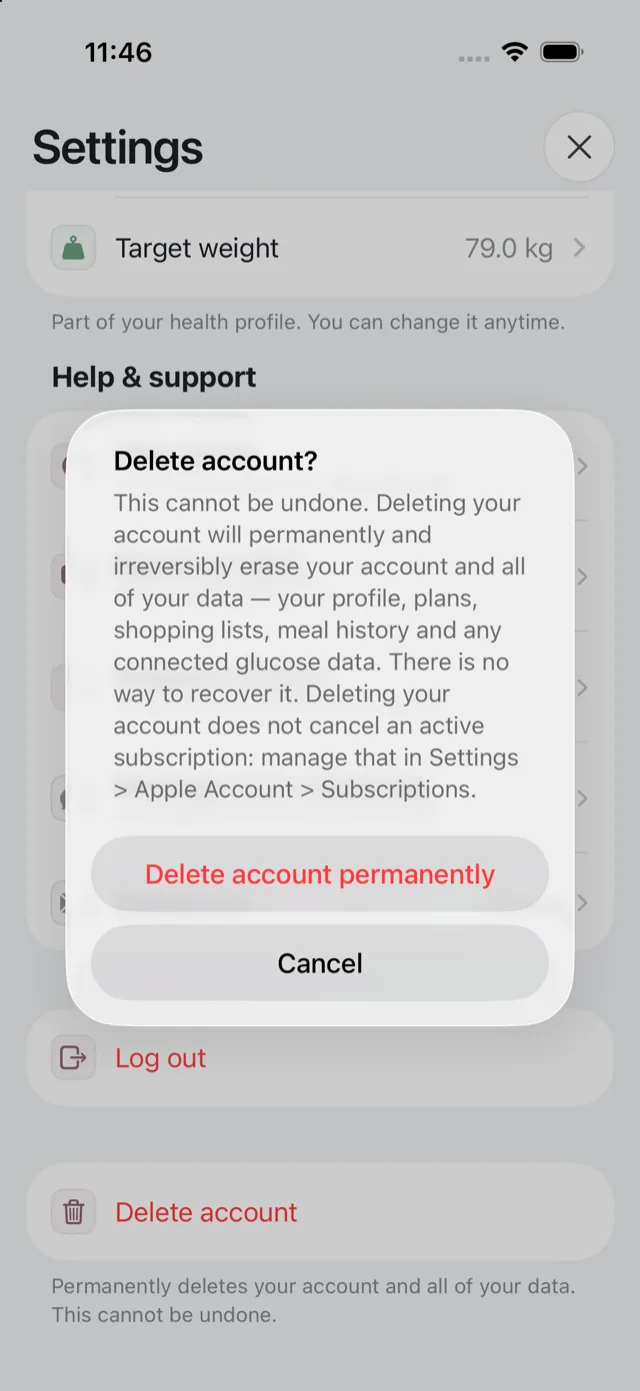
It does not cancel your subscription
This is the part people miss, and the confirmation says so. Deleting your account does not stop an Apple subscription. Cancel it separately, in Settings → Apple Account → Subscriptions on your iPhone.
If you delete your account and leave the subscription running, Apple will keep charging you. Cancel first, then delete. See cancel your subscription.
Before you delete
- If you want a copy of anything, ask for it first. Once the account is gone we cannot produce an export. See get a copy of your data.
- If you only want to stop using Bolus for a while, you do not need to delete anything. Cancel the subscription, or put a week on holiday. See holiday mode.
- If you are handing your phone on, log out instead.
Your CGM connection
Deleting your Bolus account does not change your CGM or Apple Health setup at source. Your sharing settings in Apple Health, Dexcom or Libre are yours, and you can turn Bolus’s access off there as well.
If it fails
If something goes wrong the app tells you, and your account has not been deleted. Check your connection and try again, or contact us. See get in touch with us.