How your shopping list works
Every week comes with its own shopping list, built from the meals in your plan. You will find it in the Kitchen tab.
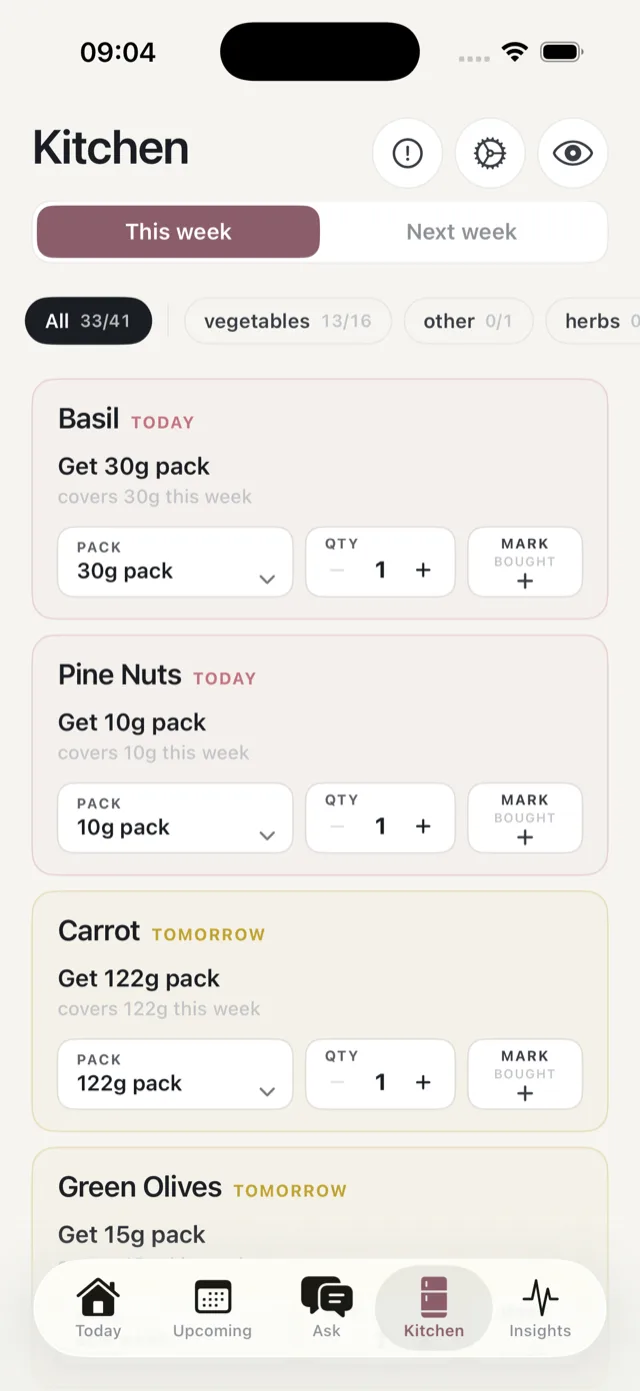
One list per week
The list covers your week and only your week. This week and Next week switch between them, and next week’s list appears once you have created that plan. There is one list per plan, so you are never juggling several.
What a row tells you
Each item is a card showing:
- The ingredient, and whether you need it today or tomorrow.
- How much to get, as a pack size, for example “Get 30g pack”.
- What it covers, for example “covers 30g this week”.
- A pack picker and a quantity stepper, if the suggested pack is not what is on the shelf.
- Mark bought, to tick it off.
Some rows are a “check you have” rather than something to buy: store cupboard basics like oil and salt.
The counter at the top
The filter chips count what you have ticked off, for example All 33/41 and then a chip per aisle. See shopping by aisle.
It keeps itself up to date
You do not have to rebuild the list when your plans change. Bolus updates it whenever you swap a meal, skip one, or change your portion or household size. Anything you have already marked as bought stays marked.
If you skip a meal you had already shopped for, those ingredients move to Surplus rather than vanishing. See the surplus section.
It does not tie you to a shop
The list is not a basket at a particular supermarket, and it does not link out to products to buy. It is a list you can take round any shop or type into any online order. Water is never on it.